Customer Reviews
An automatic email template has been added to the Communications settings to enable you to request reviews from sites like Google Reviews.
The template called Send Thank You/Review Emails can be sent automatically after a booking is checked out.
Features include:
- Add a Review Special Link to encourage customer reviews
- Fully customisable email template
- Optional send frequency control
You can set how often a client receives the email, for example:
- Only once every 6 months, regardless of how often they book.
This helps businesses collect reviews without overwhelming customers with emails.
To do this, go to Administrations > Communications.
Paste a copy of your review link (eg. your Google Review link) into the field call Review URL.
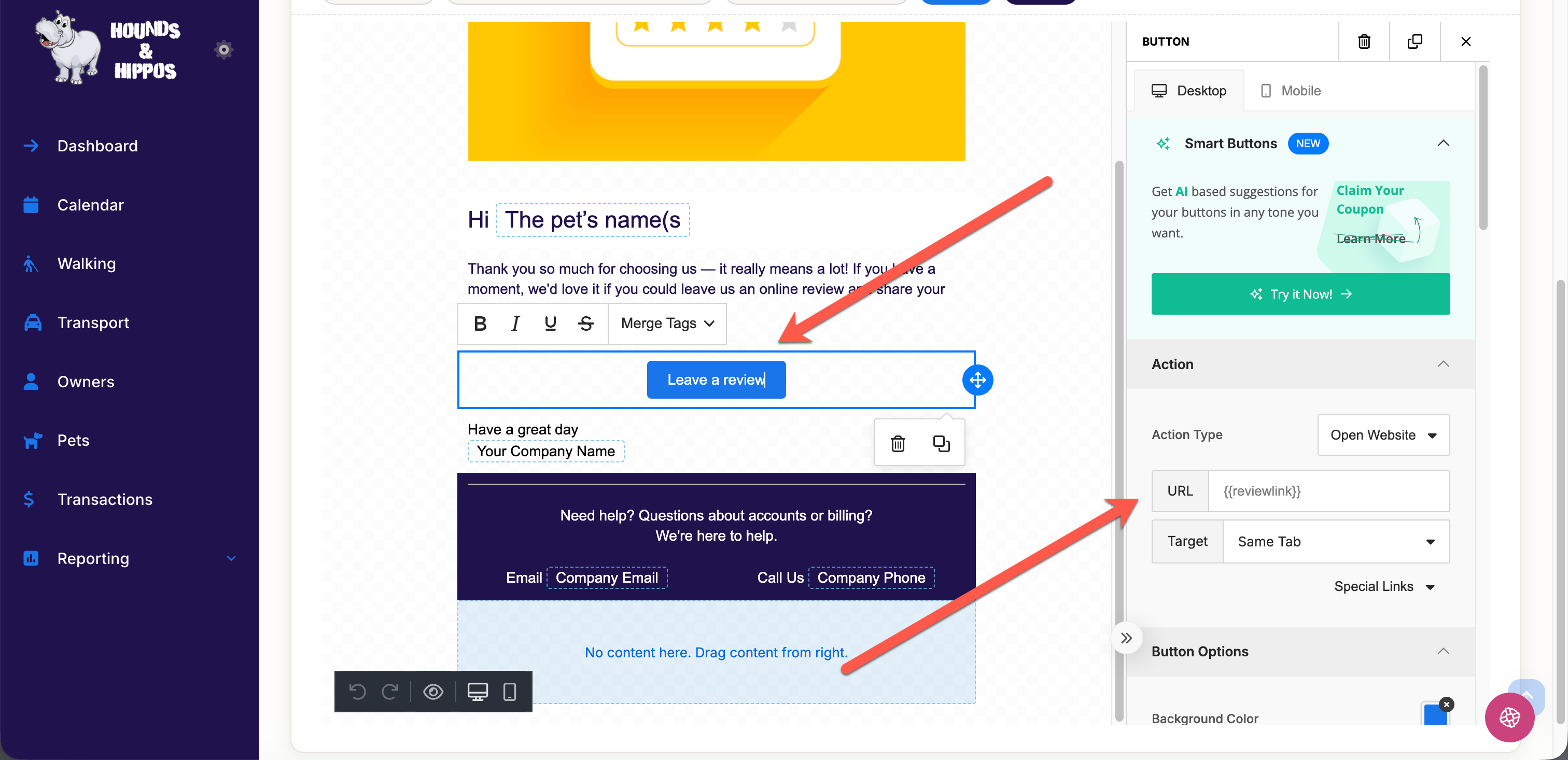
Go to the Templates tab and make any required changes to your Review Template. When adding a button for your customers to click, make sure the options are:
- Action Type: drop-down and select Open Website.
- URL: {{reviewlink}} (type exactly as shown as this will copy the review link from the Email Settings tab).
- Target: can be left as default.