
Setting up Walking Groups
Walking Groups are used to group dogs together on certain walks on specific days
To setup Group Walks, go to your Administration menu by clicking on your user icon in the top-right hand side of your screen. Then select Administration and select Walks.
This allows you to set up the Group Walk. These are groups into which each dog requiring a walk will be booked.
To add a new Group Walk, click + Add Walk
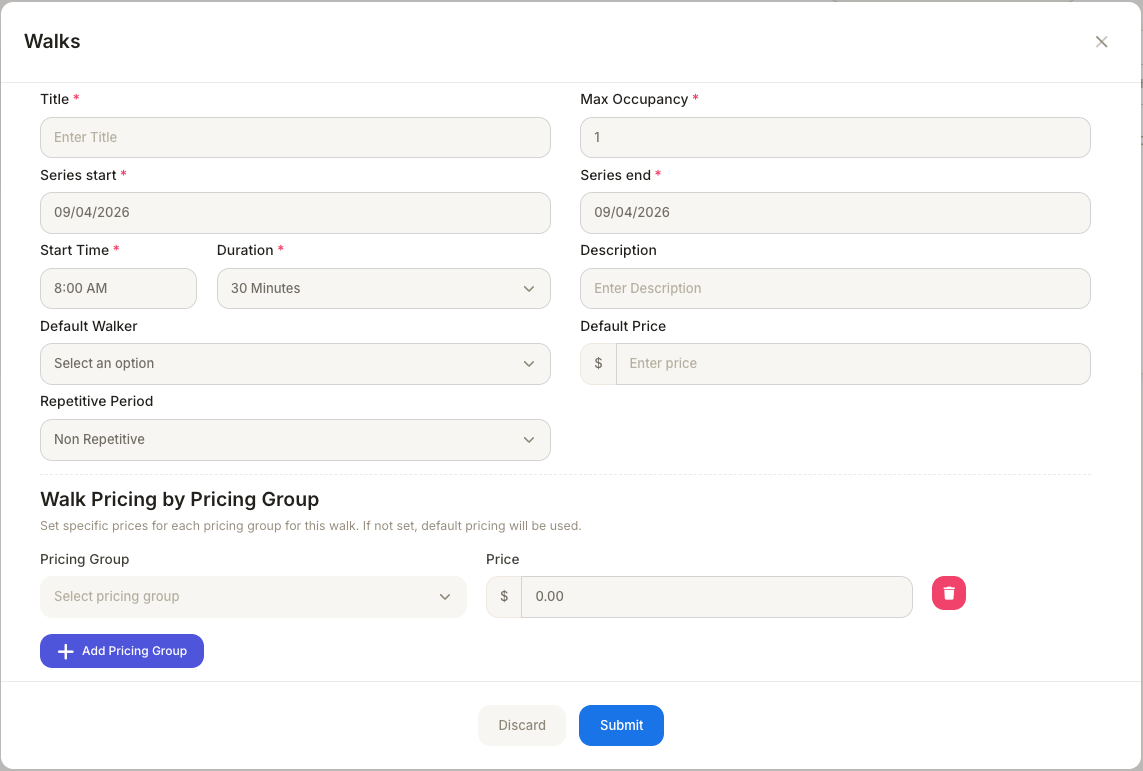
- Give the Group Walk a title, for example, Friday Morning Walk or Daily Ramble.
- The Max Occupancy specifies the maximum number of dogs that can be booked on this walk.
- Enter the series start date (this is first day from which the Group Walk is available) and the End date (after which date the Group Walk will no longer be available).
- Set the start time of the walk and the duration of the walk.
- Set who is leading the walk, which member of staff.
- Enter a Default Price. This is the price that is used if no Pricing Groups are used of if a Pet has not been assigned a specific Pricing Group.
- Set the Repetitive Period to set how often this walk is scheduled.
If you want to allow for different pricing depending on the dog, for example, by size. You can do this by assigning different prices via Pricing Groups.
Example:
Large Dog (pricing group) may be charged $75.
Small Dog (pricing group) may be charged $55.
If no pricing groups are assigned, or if a dog has not been assigned a specific pricing group, the default pricing is used.